No products in the cart.

  • INVISIO Control™ app

    $0.00

    The INVISIO Control™ app gives professionals a mobile interface to manage their INVISIO intercom system, view radio traffic, and adjust settings on the go.

    In stock

    or
    Add to Quote

    The INVISIO Control™ app puts intercom system management directly in the hands of the operator. Through an intuitive mobile interface, users can visualize radio traffic, adjust access rights, and change audio settings without returning to a vehicle or command post.

    The app supports configuration both before a mission and in real time while operations are underway, letting teams adapt their communications setup as conditions change.

    • Visualize radio traffic across the connected intercom system
    • Adjust user access rights and permissions
    • Change audio settings from a mobile device
    • Configure the system pre-mission or on the go

    Contact FarrWest for a quote.

    Description

    INVISIO Control™ app

    Tailor Your Mission and Adjust on the Go

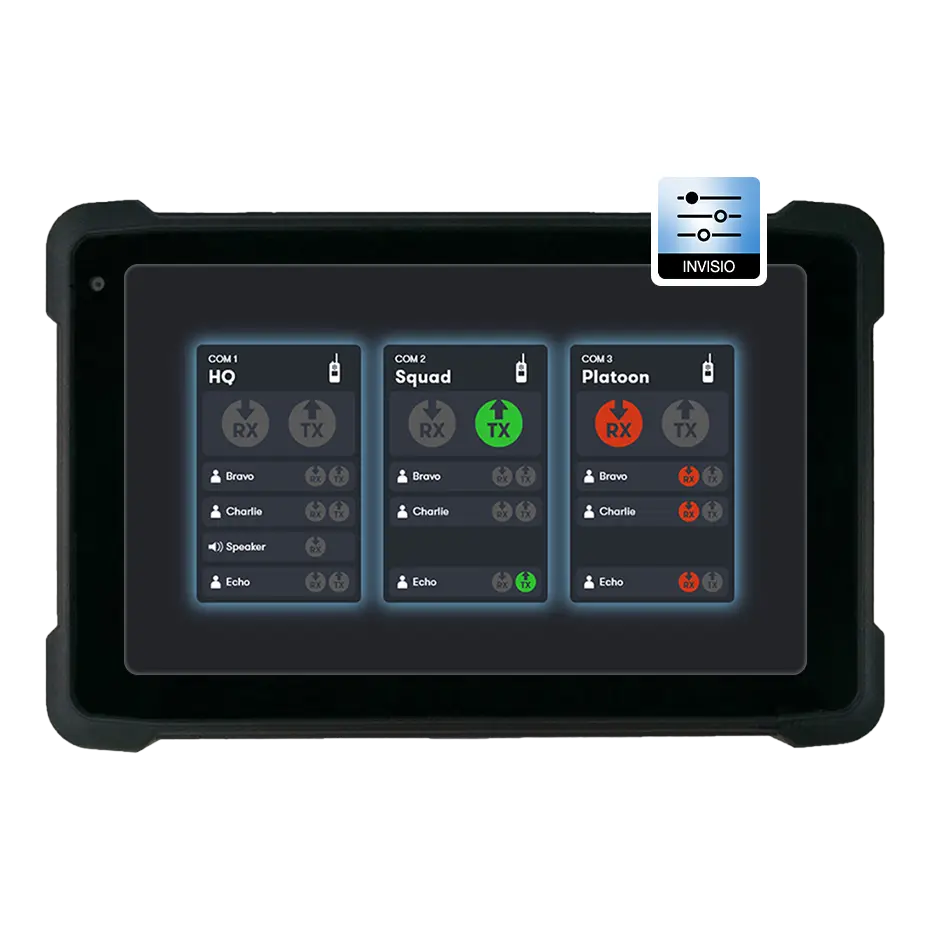
    The INVISIO Control™ app is a powerful management tool for the INVISIO Intercom system. Available as a Windows app or an API for integration, it provides an overview of communication status and allows for granular control over system settings.

    Via an intuitive interface, users can visualize all incoming (red) and outgoing (green) radio traffic, making it easy to identify active channels. The app allows for real-time adjustments, such as changing volume for individual users, adding or removing team members, and assigning radio access rights.

    The app also features seamless crossbanding capabilities, enabling users to relay radios with a simple click. Secure “two-factor authentication” prevents unauthorized relay of encrypted channels, ensuring operational security is maintained.

    Features

    • Intuitive visualization of radio traffic

    • Real-time management of user access rights

    • Independent volume control for users

    • Seamless radio relay and crossbanding

    • Available as Windows app or API

    • Secure two-factor authentication for relays

    Mission Tailoring

    The app allows commanders to tailor the radio setup for specific missions. You can assign relevant user access to specific nets and configure the system before deployment, ensuring everyone is on the right channel from the start.

    Visual Overview

    Instant visualization of communication flow helps avoid confusion. By seeing exactly who is transmitting and on which radio, operators can manage complex multi-channel environments more effectively.

    Dynamic Adjustment

    Changes can be made on the fly without programming cables. Whether you need to boost volume for a specific user or grant access to a new team member, the app provides immediate control over the intercom network.
    CONTACT US